Jalwa withdrawal problem: why it stops and how to fix it
A Jalwa withdrawal problem usually comes down to one of six things, and most of them are shown on the Withdraw page itself before you even tap the button.
New account offer in the app First deposit bonus up to ₹488 (₹18 on ₹100). One time, 1x turnover.
- Invite code auto-filled
- Sign up with phone number
- UPI deposit from ₹100
- 18+ only
Part of our Wallet guide. Back to the Jalwa Game guide home.
Quick facts
- Most common cause
- "Need to bet" is not ₹0.00
- Also check
- Beneficiary added, amount within range
- Daily count shown
- 3 withdrawals left
- Fix tickets
- Self Service Center > Withdrawal problem
On this page
1. "Need to bet" is not zero
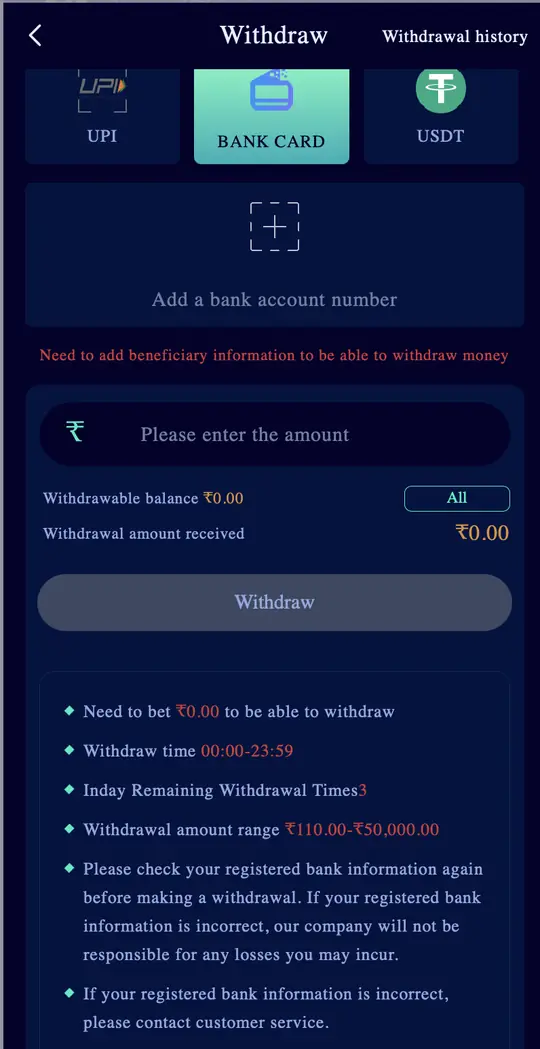
The Withdraw page shows "Need to bet ₹X to be able to withdraw". Bonuses add to this number; the first deposit bonus, for example, needs 1x bets on the bonus. Until it reads ₹0.00 the request will not go through.
2. No beneficiary added
A red line says "Need to add beneficiary information to be able to withdraw money". Add your bank account, UPI ID or USDT address first.
3. Amount outside the range
Bank card withdrawals run from ₹110 to ₹50,000 and USDT from ₹1,000 to ₹10,00,000. An amount outside the range fails.
| Method | Range shown |
|---|---|
| Bank card | ₹110 to ₹50,000 |
| USDT | ₹1,000 to ₹1,000,000 |
4. Daily withdrawal count used up
The page shows "Today's remaining withdrawal times". Ours showed 3. If it reaches 0, wait for the next day.
5. Wrong bank or IFSC details
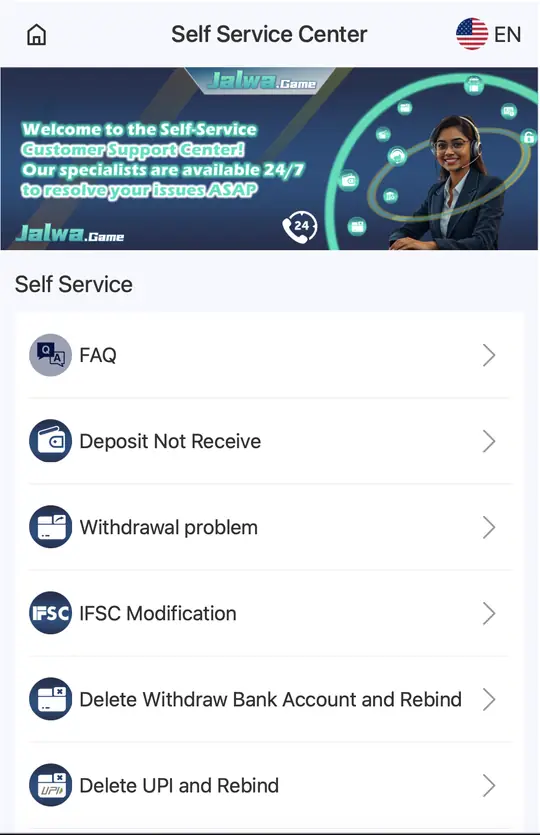
The page warns that the company is not responsible for losses from incorrect bank details. If you spot a mistake, use the Self Service options IFSC Modification, Change bank name, or Delete Withdraw Bank Account and Rebind.
6. Money sitting in the 3rd party wallet
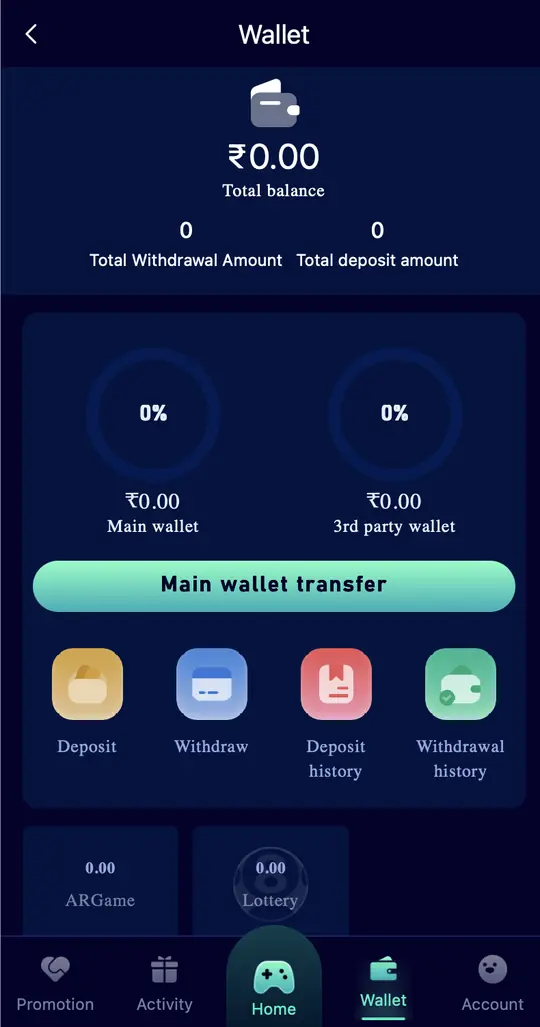
After a slot, casino or sports game, part of your balance can stay in the 3rd party wallet. Open Wallet and tap Main wallet transfer, then withdraw.
Jalwa game withdrawal processing problem
- Open Withdrawal history and filter by method (ARPay, UPI, Bank Card, USDT) and date.
- For USDT, remember the 3 blockchain confirmations before it lands.
- If it is still stuck, open Account > Customer Service > Self Service Center > Withdrawal problem and submit it.
- Track the ticket with Progress Query. The Kind tips say a specialist handles it after submission.
Avoid "withdrawal release fee" scams
Nobody can release a withdrawal for a fee. People who ask for a "processing charge" or your UPI PIN are not Jalwa support. See Jalwa customer care for the real help options.
Withdrawal atak gaya?
Pehle dekhiye "Need to bet" ₹0.00 hai ya nahi, bank ya UPI add hai ya nahi, aur amount range mein hai ya nahi. Phir bhi atka ho to Self Service mein Withdrawal problem bhariye aur Progress Query se status dekhiye. Fee maangne wale fraud hain.
FAQs
Why is my Jalwa withdrawal not working?
Usually "Need to bet" is not ₹0.00, no beneficiary is added, or the amount is outside the range.
What if my Jalwa withdrawal is stuck in processing?
Check Withdrawal history, then submit "Withdrawal problem" in the Self Service Center and track it with Progress Query.
How do I change my bank details on Jalwa?
Self Service Center has IFSC Modification, Change bank name and Delete Withdraw Bank Account and Rebind.
Koi fee lekar withdrawal clear karega?
Nahi. Withdrawal ke liye fee maangne wale log fraud hain.
Most read: how to log in to Jalwa · Jalwa register with invite code · real Jalwa APK