Jalwa Pay: ARPay and the AR Wallet
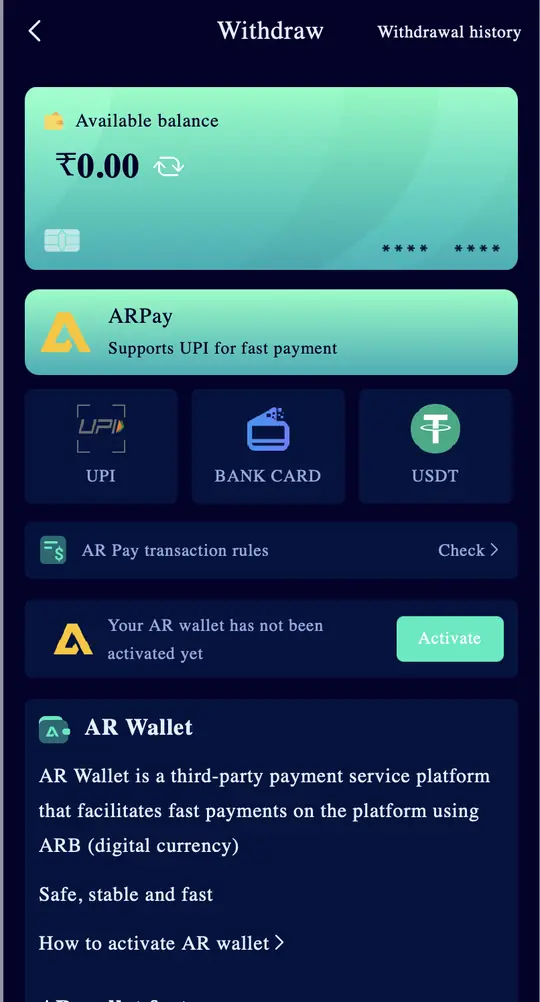
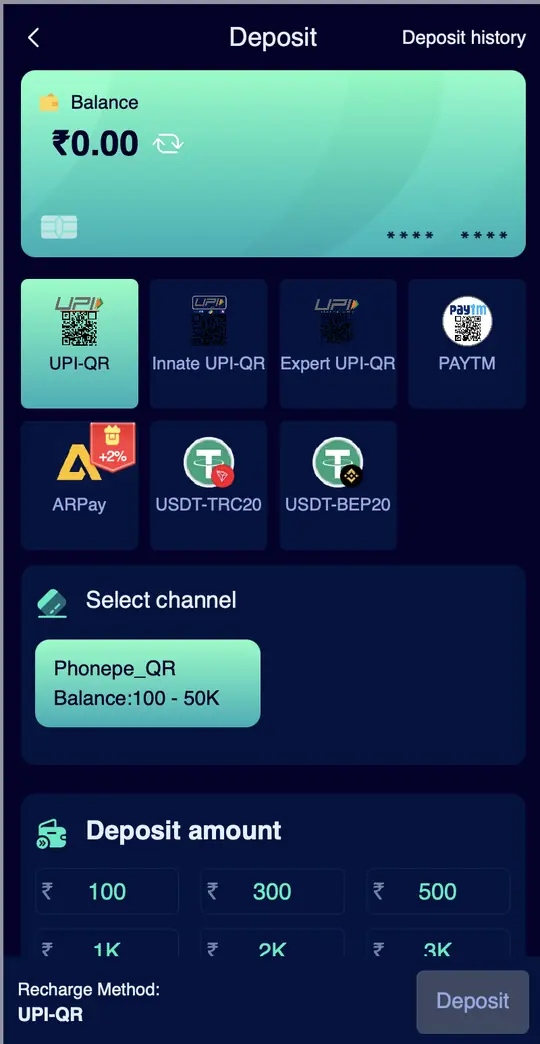
Jalwa Pay is what most players call ARPay, the deposit option on the Jalwa Deposit page that carries a +2% badge. It runs through the AR Wallet, which you activate once and can then use for deposits and withdrawals.
New account offer in the app First deposit bonus up to ₹488 (₹18 on ₹100). One time, 1x turnover.
- Invite code auto-filled
- Sign up with phone number
- UPI deposit from ₹100
- 18+ only
Part of our Wallet guide. Back to the Jalwa Game guide home.
Quick facts
- Badge on Deposit page
- +2%
- Runs through
- AR Wallet (activate first)
- App description
- Third-party payment service using ARB, a digital currency
- Withdraw side
- ARPay, "Supports UPI for fast payment"
- Rules
- AR Pay transaction rules > Check
On this page
What the +2% badge means for your deposit
ARPay is the only deposit method with a badge, and a home banner says "Boost your Deposit to Earn and Withdraw Easily Using AR Wallet!". On a ₹1,000 deposit a 2% boost is ₹20, on ₹5,000 it is ₹100. We have not opened the AR Pay transaction rules screen yet, so tap Check next to "AR Pay transaction rules" on the Withdraw page to see exactly how the 2% is paid before you rely on it.
| ARPay deposit | 2% of it |
|---|---|
| ₹500 | ₹10 |
| ₹1,000 | ₹20 |
| ₹5,000 | ₹100 |
| ₹10,000 | ₹200 |

How to activate the AR Wallet
- Log in and tap Withdraw on the home screen.
- Under ARPay you will see "Your AR wallet has not been activated yet". Tap Activate.
- Follow "How to activate AR wallet" on the same screen.
- Once active, ARPay works on both the Deposit and Withdraw pages, and an ARWallet shortcut sits on the Account tab.
Deposit with ARPay
Open Deposit, tap the ARPay tile (the one with the red +2% tag), enter the amount and complete the payment in the AR Wallet. The same recharge rules apply as every method: pay the exact order amount and never cancel the order after paying. All other methods are compared on the Jalwa deposit page.
Withdraw with ARPay
ARPay is the first card on the Withdraw page, described as "Supports UPI for fast payment", and Withdrawal history has its own ARPay tab. We did not capture an ARPay withdrawal range, so check the screen for the limit. Bank and USDT limits are on Jalwa withdrawal.
Jalwa Pay app and Jalwa Pay APK
Searches for a "Jalwa Pay app" or "Jalwa Pay APK" are common. Inside Jalwa we only saw the AR Wallet activation flow and the ARWallet entry on the Account tab, not a separate download. Do not install a "Jalwa Pay APK" from Telegram or a random site; a fake wallet app is the easiest way to lose both your deposit and your login.
ARB and keeping money in a wallet
The app describes the AR Wallet as a third-party platform that uses ARB, a digital currency. Like any third-party wallet, keep only what you plan to deposit soon, and move winnings out instead of leaving them there.
Before you put money in
Ask yourself one thing: would losing this amount hurt? If yes, put in less. Jalwa itself warns that gambling can be addictive and is for 18+ only, and some Indian states restrict real-money games.
Jalwa Pay short mein
Jalwa Pay matlab ARPay. Deposit page par iske upar +2% likha hota hai. Pehle Withdraw page par AR wallet Activate kijiye, phir ARPay se deposit aur withdraw dono ho jaate hain. "Jalwa Pay APK" kisi bhi random site se mat lijiye.
FAQs
What is Jalwa Pay?
It is ARPay, the deposit and withdrawal option that runs through the AR Wallet and shows a +2% badge on the Deposit page.
How do I activate the Jalwa AR Wallet?
Open Withdraw, find "Your AR wallet has not been activated yet" under ARPay and tap Activate, then follow "How to activate AR wallet".
Is there a Jalwa Pay app?
We did not see a separate download inside Jalwa. Avoid "Jalwa Pay APK" files from other sites.
ARPay ka +2% kaise milta hai?
Withdraw page par "AR Pay transaction rules" ke Check button mein exact rules hain. Deposit se pehle ek baar zaroor padh lijiye.
Most read: Jalwa login guide · Jalwa first deposit bonus · install the Jalwa app