Jalwa login problem: forgot password and other fixes
A Jalwa login problem is almost always one of five things: wrong number or password, a forgotten password, a verification code that did not arrive, a link that will not open, or an account issue that needs support. Each fix is below.
New account offer in the app First deposit bonus up to ₹488 (₹18 on ₹100). One time, 1x turnover.
- Invite code auto-filled
- Sign up with phone number
- UPI deposit from ₹100
- 18+ only
Part of our Account and login guide. Back to the Jalwa Game guide home.
Quick facts
- Reset screen
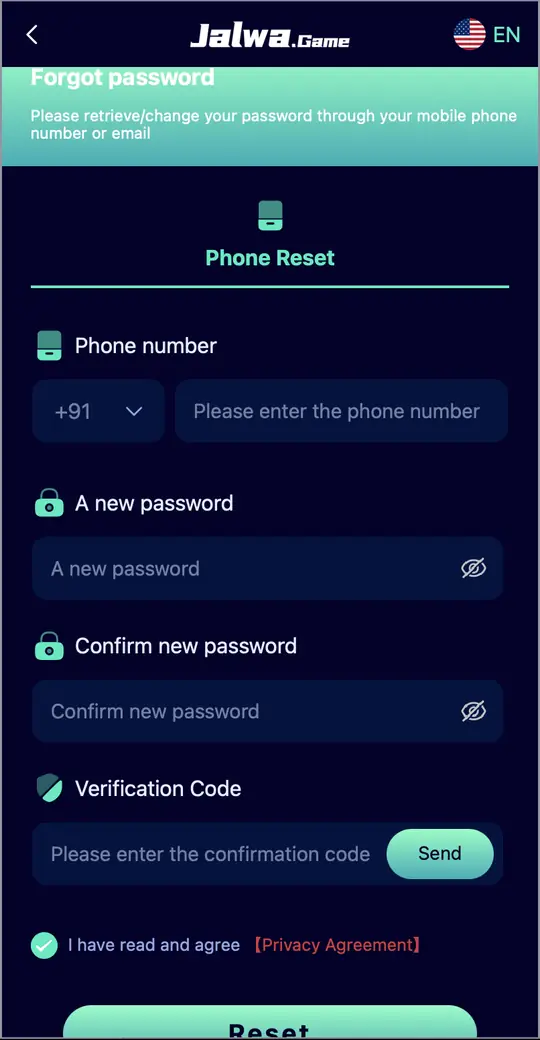
- Forgot password > Phone Reset
- Needs
- Phone number, new password, verification code
- Self service
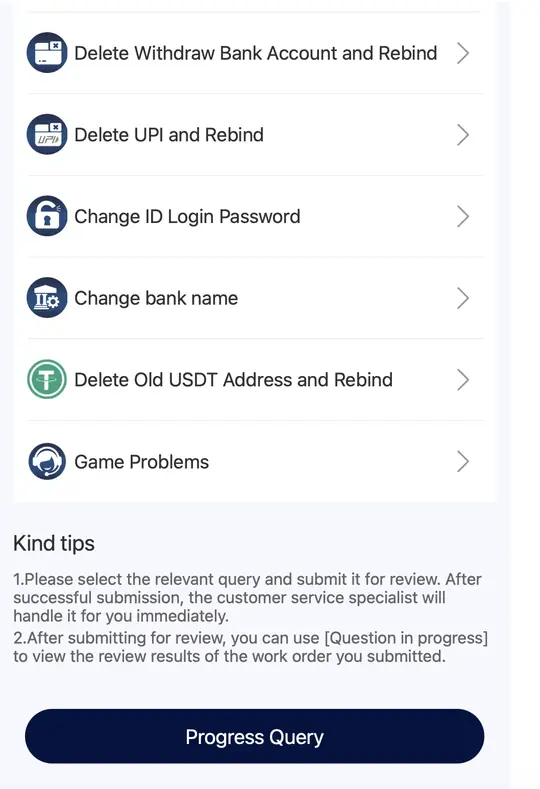
- Change ID Login Password
- Support
- In-app Customer Service
On this page
1. Wrong number or password
Check that +91 is selected and that you typed the number you registered with. Passwords are case sensitive, so tap the eye icon to see what you typed. If you registered with a phone number, use the Phone Number tab, not Email.
2. Forgot password
- Tap Forgot password? on the login screen.
- On Phone Reset, enter your phone number.
- Type a new password and confirm it.
- Tap Send, then enter the verification code.
- Tick the Privacy Agreement box and tap Reset.
3. Verification code not coming
Wait a minute before tapping Send again. Check that the number is right and your phone has signal. If it still fails, use the self-service option described below.
4. Jalwa link not opening
Jalwa uses numbered addresses, and an old saved link can stop working. Use the current official Jalwa link, clear your browser cache, or switch between Wi-Fi and mobile data. A banner in the app suggests installing 1.1.1.1 for a faster connection; that is optional.
5. Change login password through Self Service
If you can reach the Self Service Center (Account, then Customer Service), it has a "Change ID Login Password" option, plus FAQ, Deposit Not Receive, Withdrawal problem and more. Submit the query, then use Progress Query to track it.
Login works but balance looks wrong?
Tap the refresh icon next to your balance. Money moved to a game can sit in the 3rd party wallet; use Main wallet transfer on the Wallet tab. See Jalwa withdrawal for withdraw issues.
Login problem ka jaldi solution
Password bhool gaye to Forgot password? dabaiye, number daaliye, naya password banaiye aur Send dabakar code daaliye. Link na khule to naya official link use karein. Phir bhi problem ho to app ke Customer Service mein Change ID Login Password option hai.
FAQs
Why can I not log in to Jalwa?
Usually a wrong number, wrong password or an old link. Check +91, use the eye icon to check your password, and use the current official link.
How do I reset my Jalwa password?
Forgot password? > Phone Reset > enter number and new password > Send code > Reset.
Jalwa verification code nahi aa raha?
Ek minute ruk kar dobara Send karein, number check karein. Phir bhi na aaye to Customer Service ke Self Service se request karein.
Will support ask for my password?
Real support does not need your password or verification code. Never share them.